

 Written by
 WooCommerce stores that sell once are stuck on a treadmill. Find a buyer. Convert them. Watch them disappear. Start over. Every month, the same chase.
WooCommerce stores that sell on subscription play a different game. Recurring revenue. Predictable cash flow. Customers who pay every month without being re-acquired. Lifetime value that compounds instead of resetting.
The difference between these two stores is one thing: a subscription plugin. WooCommerce doesn’t do recurring billing on its own. It needs help. And the help comes in many forms, each with different strengths.
This post breaks down the 5 essential subscription plugins for a WooCommerce store in 2026. Each one comes with a “Pick this if…” checklist so the right choice becomes obvious. Verified pricing pulled directly from each tool’s website. Honest pros and cons.
Let’s get into it.
Table of content
What Makes a Subscription Plugin “Essential” in 2026
Before the list, here’s the short version of what an essential subscription plugin should do.
Handle recurring billing without manual work. The plugin charges cards on the right day, every cycle, with no help from the team. Failed payments retry automatically.
Give customers a self-service dashboard. Members have the ability to stop their service and terminate their subscription, and increase their existing plan through their personal account management system.
The single feature functions to decrease customer cancellations through a ten-to-fifteen percent reduction in their numbers.
Support multiple payment gateways. The payment system includes Stripe and PayPal as well as additional regional options through Razorpay and Mollie services. Single-gateway plugins lose conversions when buyers can’t pay their preferred way.
Offer free trials and sign-up fees. Free trial offerings enable businesses to boost their registration numbers by thirty to fifty percent.
The fees that new members pay during registration help businesses handle their initial onboarding expenses.
Send the right emails at the right time. Welcome emails, renewal reminders, failed payment alerts, and cancellation confirmations. All automatic. All on-brand.
Any subscription plugin missing more than one of these isn’t truly essential for a serious WooCommerce store. The 5 picks below all check these boxes.
1. WPSubscription
Pick this if:
- The store wants a real free version on WordPress.org to test the subscription model
- The budget is under $100/year for the paid tier
- Big-ticket products need split payment options (pay in installments)
- One-time lifetime deals matter more than yearly fees
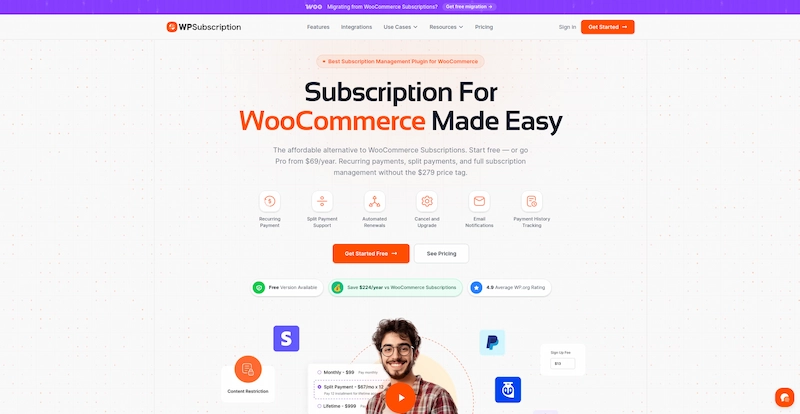
WPSubscription is the smartest pick of the 5 essential subscription plugins for most WooCommerce stores in 2026. It’s built by Convers Lab, sits on WordPress.org with a 4.9 rating, and ships with a real working free version. Not a stripped trial. A working plugin.
The standout feature is split payment. Most subscription plugins only do “pay every month forever.” WPSubscription lets a $300 course be sold as 6 monthly payments of $50. Buyers who couldn’t drop $300 upfront convert at 2-3x the rate. Once paid in full, the buyer is done. Few other WooCommerce subscription plugins handle this cleanly.
Verified Pricing
- Free version on WordPress.org
- Basic: $89/year (1 site)
- Standard: $149/year (5 sites)
- Pro: $299/year (50 sites)
- 14-day money-back guarantee
Main Features
- Recurring billing in daily, weekly, monthly, yearly cycles
- Split payments (pay in installments)
- Free trials and one-time sign-up fees
- Customer self-service dashboard
- Auto user role assignment for membership content
- Stripe, PayPal, Paddle, Razorpay, Mollie, WooEpay
- Pending cancellation (members keep access through paid period)
- Email alerts for renewals, failed cards, welcomes
- Free migration from WooCommerce Subscriptions
Pros
- Real free version that works
- Cheapest paid plan at $69/year
- Split payments lift conversion on big-ticket products
- Lifetime AppSumo deal at $59 for one-time payment lovers
- Active monthly updates
- 4.9 star rating on WordPress.org
Cons
- Newer plugin, smaller add-on library than the official Automattic plugin
- Free version limits gateways to PayPal Standard
- Variable subscriptions less mature than the official plugin
For most WooCommerce stores, WPSubscription is the smart top pick among the essential subscription plugins for 2026.
2. YITH WooCommerce Subscription
Pick this if:
- The WooCommerce store sells subscription boxes (coffee, beauty, pet, snack)
- Members should be able to customize their monthly box contents
- WPML support matters for multi-language stores
- The store already uses other YITH plugins
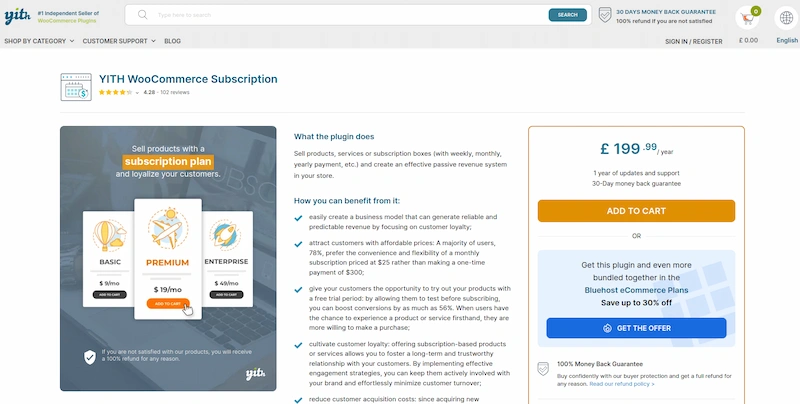
YITH has been making WordPress plugins for over a decade. Their subscription plugin serves 28,000+ active users and shines for one specific use case: subscription boxes.
The “Subscription Box” product type lets members build their own box from a curated list. So a coffee subscription box can let members pick their preferred roasts each month. A beauty box can let members swap items based on skin type. This personalization keeps engagement high and reduces cancellations.
No other plugin on this list handles subscription boxes this well.
Verified Pricing
- €199.99/year for 1 site (about $215 USD)
- Free version on WordPress.org with limited features
- 30-day money-back guarantee
Main Features
- Subscription Box product type (YITH exclusive)
- Recurring billing on simple, variable, and downloadable products
- Free trials and sign-up fees
- Coupon support inside subscriptions
- Synchronized renewals
- WPML support for multi-language stores
- Schedule and print delivery labels for boxes
Pros
- Subscription box feature is one-of-a-kind
- 4.28/5 rating from 102 verified reviews
- Strong WPML and multi-currency support
- Works smoothly with other YITH plugins
Cons
- Free version is very limited
- Most paid gateways need separate YITH add-ons
- Add-on costs stack up fast
- Setup learning curve is steeper than newer plugins
3. WP Swings Subscriptions for WooCommerce Pro
Pick this if:
- The store wants to reward subscribers with loyalty points on renewals
- A WPLoyalty integration matters
- The budget is in the $100-$150/year range
- Both free and Pro tiers should be available
WP Swings split off from MakeWebBetter in 2022 and has been growing their subscription plugin ever since. The standout feature is the WPLoyalty integration.
Every renewal earns the subscriber loyalty points. Points cash in for store credit, free products, or discounts. This single feature lifts retention by 15-25% in stores that use it. Members who earn rewards every month stay 4-6 months longer than members who don’t.
Verified Pricing
- Free version on WordPress.org
- Pro: $129/year (was $149)
- 30-day money-back guarantee
Main Features
- Recurring billing on simple and variable products
- Free trials and sign-up fees
- Manual subscription creation by admin
- Pause, cancel, and upgrade options
- WooCommerce Stripe, PayPal Standard, Amazon Pay, Payfast
- WPML compatibility
- WPLoyalty integration for renewal rewards
Pros
- Affordable Pro plan at $129/year
- Solid free version on WordPress.org
- 173+ user reviews praising support quality
- Loyalty integration boosts retention
- Active development with regular updates
Cons
- Smaller gateway list than the official Automattic plugin
- Free version doesn’t include automatic recurring with all gateways
- Reports are basic compared to YITH or the official plugin
- Free-vs-Pro feature splits can feel confusing
4. WooCommerce Subscriptions
Pick this if:
- The WooCommerce store does 1,000+ subscription transactions per month
- Synced renewals (all members billed on the same day) are a must-have
- Proration on mid-cycle plan changes is needed
- Enterprise reliability beats cost savings
The official subscription plugin from Automattic. It’s the most well-known of all WooCommerce subscription plugins and powers many large-scale subscription stores online.
The trade-off is the price. $279/year is significant. But for stores that need enterprise-level reliability, the largest add-on ecosystem in the WooCommerce world, and integration with 25+ payment gateways, this plugin earns its keep. Synced renewals deserve special mention.
Verified Pricing
- $279/year for unlimited sites
- No free version
- 30-day money-back guarantee
Main Features
- Simple, variable, and grouped subscription products
- Synced renewals (all members billed the same day)
- Proration for mid-cycle plan changes
- 25+ payment gateway integrations
- Strong API for custom workflows
- Detailed reports on revenue and churn
- Largest add-on library
Pros
- Made by Automattic, the team behind WordPress
- Most stable, battle-tested option
- Largest set of third-party integrations
- Powers thousands of large stores worldwide
- Synced renewals create a predictable cash flow
Cons
- Most pricey at $279/year
- No free version
- Setup takes longer than newer tools
- 3.2-star rating on WooCommerce.com (mixed support reviews)
- Some advanced features need extra paid add-ons
5. WebToffee Subscriptions for WooCommerce
Pick this if:
- The WooCommerce store wants progressive renewal discounts to reward long-term members
- A trusted brand matters more than free-version testing
- The budget is around $89/year
- A 4.7+ user rating builds confidence
WebToffee is a trusted name in the WordPress plugin world. Their subscription plugin is now managed by ThemeHigh and includes one of the strongest retention features in this category: built-in renewal discounts.
The renewal discount feature lets the store automatically reward long-term subscribers with progressively bigger discounts. Month 1 is full price. Month 6 drops to 10% off. Month 12 reaches 20% off. Members see real value in staying, which directly lifts retention.
No other plugin on this list includes renewal discounts this cleanly.
Verified Pricing
- $89/year for a single-site license
- 30-day money-back guarantee
- 4.7/5 average rating
Main Features
- Simple and variable subscription products
- Free trials and sign-up fees
- Built-in renewal discounts (fixed or percentage)
- Synchronized renewals
- Stripe and PayPal integrations
- Customer dashboard for plan management
- WPML and multi-language support
- Coupon support inside subscriptions
Pros
- Renewal discount feature is unique and powerful
- Fair $89/year price
- Trusted brand with many WordPress plugins
- 4.7/5 rating from real users
- Clean, easy admin dashboard
Cons
- No free version, just a money-back guarantee
- Fewer payment gateways than WPSubscription
- UI is functional but not the prettiest
- Add-ons can push the cost up
Quick Compare: All 5 Essential Subscription Plugins
| Plugin | Best For | Pricing | Free Plan | Standout Feature |
|---|---|---|---|---|
| WPSubscription | Most stores + budget-aware | $69/year + lifetime $59 | Yes | Split payments lift conversion 2-3x |
| YITH Subscription | Subscription box stores | €199.99/year | Limited | Subscription box product type |
| WP Swings Pro | Loyalty-focused stores | $129/year | Yes | WPLoyalty rewards on renewals |
| WooCommerce Subscriptions | Enterprise scale | $279/year | No | Synced renewals + biggest add-on library |
| WebToffee | Retention through renewal discounts | $89/year | No | Built-in renewal discounts |
Setup Checklist for the First Week
Picking a subscription plugin is step one. Getting it working well is step two. Here’s a quick checklist for the first week after installing any of these subscription plugins.
Day 1: Install the plugin. Connect at least one payment gateway (Stripe and PayPal recommended). Create the first subscription product on a popular existing item.
Day 2: Set up the customer self-service dashboard. Test pause, cancel, and upgrade flows from a buyer’s perspective. Fix anything confusing.
Day 3: Configure email notifications. Welcome email, renewal reminder, failed payment alert, cancellation confirmation. Customize each to match brand voice.
Day 4: Set up failed payment recovery. Most subscription plugins offer auto-retry. Turn it on. This single setting recovers 5-10% of failed renewals.
Day 5: Add a free trial period to the subscription product. 7 days is the safe default. Test the trial flow end-to-end.
Day 6: Set up subscription analytics or reports. Most plugins include basic reports. Know which ones matter (active subscribers, monthly recurring revenue, churn rate).
Day 7: Soft launch to a small audience. Email list, returning customers, or social followers. Watch the first 5-10 subscriptions roll in. Tweak anything that breaks.
That’s it. Most stores can be live with subscriptions inside a week with the right plugin.
Common Mistakes WooCommerce Stores Make With Subscriptions
A few common traps that hurt subscription growth:
Mistake 1: Skipping the customer dashboard. Members hate emailing support to cancel or update payment info. Self-service cuts friction and lowers churn.
Mistake 2: No failed payment recovery. Cards fail. A plugin without auto-retry loses 5-10% of monthly revenue.
Mistake 3: Pricing subscriptions too high. Members hesitate to commit to expensive monthly plans. Lower the price, use split payments, or offer free trials.
Mistake 4: Generic renewal emails. Boilerplate “your subscription renews tomorrow” emails get ignored. Personal touches lift open rates.
Mistake 5: No win-back strategy. Canceled members can come back. A small discount sent 30 days after cancellation often wins back 20-30% of churned subscribers.
Why Subscriptions Are the Smartest Move for WooCommerce in 2026
Recurring revenue changes how a WooCommerce store grows.
A store selling $50 one-time products needs constant new customer acquisition. The business faces complete revenue loss when all advertisements are discontinued.
A store with 100 active subscribers at $30/month has $3,000 in monthly recurring revenue. The money keeps flowing even though no new subscribers have joined.
The base will reach $6,600 per month after twelve months when you add ten new subscribers each month. The business generates $79,200 in yearly recurring revenue from its initial $3,000 base.
The numbers compound. The proper WooCommerce subscription plugins enable business expansion through customer acquisition, which prevents team exhaustion from acquisition work.
Final Thoughts
Every WooCommerce store should add subscriptions in some form in 2026. The technology is mature. The plugins are affordable. The customer expectation is there.
Out of the 5 essential subscription plugins above, WPSubscription is the smart top pick for most WooCommerce stores. The combination of a real free version, an affordable Pro plan, a split payment feature, and active development creates a complete retention package at a fraction of the official plugin’s price.
For enterprise scale, WooCommerce Subscriptions. For subscription boxes, YITH. For loyalty rewards, WP Swings Pro. For progressive renewal discounts, WebToffee.
Pick one this week. Start with the free version if money’s tight. Set up the first subscription product on a popular item. Watch how recurring revenue starts compounding over the next 60 days.
That’s how WooCommerce stores grow without burning out on customer acquisition. Predictable monthly income. Loyal members. Steady cash flow. All from picking the right subscription plugin at the right time.
Interesting Reads
How Instagram Marketing Evolved: Tracking The Social Media Evolution